Picasa CCTV (for Android 2.3+)0.0.9
Publisher Description
*******************
*** IMPORTANT NOTICE ***
- 2019.01.29.
Here's the new version which uses Dropbox API: http://bit.ly/cctv_box
- 2019.01.23.
Google's Picasa API stopped working recently,
and this app cannot be maintained without changing the API to the new Google Photos API.
Unfortunately, Google Photos API takes quite much money for me,
so I'm developing a similar app which runs on Dropbox.
Sorry for the inconvenience.
*******************
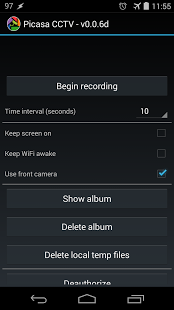
Use your android device as a personal CCTV.
It will take and upload photos periodically to your Picasa web albums(now Google Photos),
and you can browse them later.
* Known issues *
- It may not work as expected if your 'google play service' is outdated.
- Taken photos will have the same resolution as your device's screen.
- You may need to configure your Google Photos service first.
- On some devices, camera preview or captured images are seen rotated 180 degrees. You can rotate them back with options in the app.
About Picasa CCTV (for Android 2.3+)
The company that develops Picasa CCTV (for Android 2.3+) is Sungjin Han. The latest version released by its developer is 0.0.9. This app was rated by 1 users of our site and has an average rating of 4.0.
To install Picasa CCTV (for Android 2.3+) on your Android device, just click the green Continue To App button above to start the installation process. The app is listed on our website since 2017-10-10 and was downloaded 79 times. We have already checked if the download link is safe, however for your own protection we recommend that you scan the downloaded app with your antivirus. Your antivirus may detect the Picasa CCTV (for Android 2.3+) as malware as malware if the download link to kr.pe.meinside.cctv2 is broken.
How to install Picasa CCTV (for Android 2.3+) on your Android device:
- Click on the Continue To App button on our website. This will redirect you to Google Play.
- Once the Picasa CCTV (for Android 2.3+) is shown in the Google Play listing of your Android device, you can start its download and installation. Tap on the Install button located below the search bar and to the right of the app icon.
- A pop-up window with the permissions required by Picasa CCTV (for Android 2.3+) will be shown. Click on Accept to continue the process.
- Picasa CCTV (for Android 2.3+) will be downloaded onto your device, displaying a progress. Once the download completes, the installation will start and you'll get a notification after the installation is finished.
Program Details
System requirements
Download information
Pricing
Version History
version 0.0.9
posted on 2017-10-10
Updated libraries and SDKs
version 0.0.7
posted on 2016-11-07
- optimized photos list
version 0.0.6b
posted on 2012-08-22
Several fixes and updates
